[RC] Week #6: Half-batch check-in + Google AI Pro Fiasco
10 May, 2026Context about what “Recursers” do day-to-day
See my Week #2 snippet for details. Here’s a LinkedIn short video where Nicholas (RC CEO) explains it really clearly.
Week 6 Progress (official Half-Batch)
Last week I pivoted my project from re-implementing the Android calculator in Zig to re-implementing the UNIX dc calculator in Zig.
I started learning dc syntax and functionality; the syntax is definitely not from this generation.
It’s humbling to see and understand the design of a tool that’s been around for more than half a century.
In university, I practiced some code-golf; back then I used Perl mostly for that purpose.
Dc is a great language for code-golf - the shortest version of a program to print itself is: dc -e '6581840dnP' (as provided to me by a fellow RC person).
How it works is amazing:
Breaking it into parts, we have:

6581840 <-- put this number onto the stack; in base-256 encoding, this number reads as "dnP"
d       <-- copy the top of the stack, so we have that number twice
n       <-- this will pop the top of the stack and print it (as a regular decimal)
6581840 --> first part of the output that you see
P       <-- prints the top of the stack as encoded into a base-256 number; this is a beautiful hack to add string manipulations to a calculator
dnP     --> second part of the output
Most of my week I spent on the “AI Pro Fiasco” project, which is to organize personal finances from multiple US and EU accounts into a single pivot table in Google Sheets.
Challenges
Not much focus time last week, as we continue to settle in our place in Portugal.
 An actual data point from doing that – when planning a career break and estimating monthly expenses – multiply your estimate by two and add 20% =/
AI Pro Fiasco 
Key observation I got is – sticking to a plain-text/Git-managed/agent-CLI interface is the best way to consume tokens and be productive with it.
Google provides an option to have “AI Kool-Aid” in the Google apps (Docs, Sheets, Gmail, Drive) – called “AI Pro”.
I use Drive, Docs, and Sheets mostly. For each, I summarized the current UX when “AI Pro” is ON, and a common task for me that Gemini failed with flying colors.
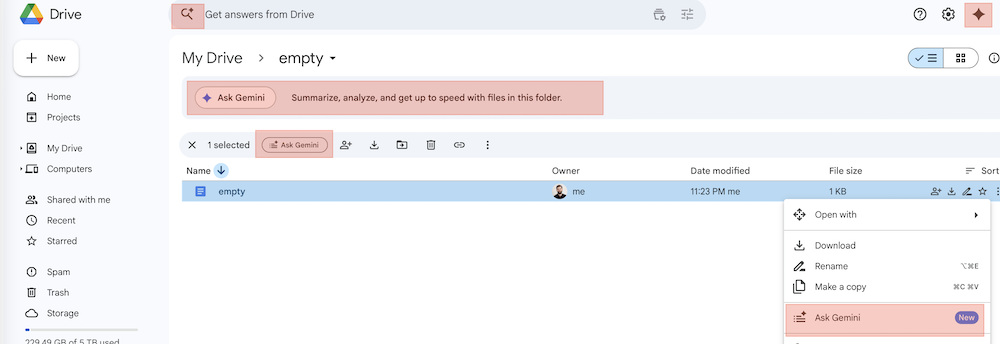
Google Drive
- Task it failed miserably at - move all CSV docs from directory A to B and create subdirectories for every month. Turns out AI for Google Drive can’t create directories or move files between directories … sigh.
- Side note: None of those “AI” features are integrated into the Desktop Mac app for GDrive. It’s not even possible to get a link to a Google doc from the desktop app(!)
Google Docs
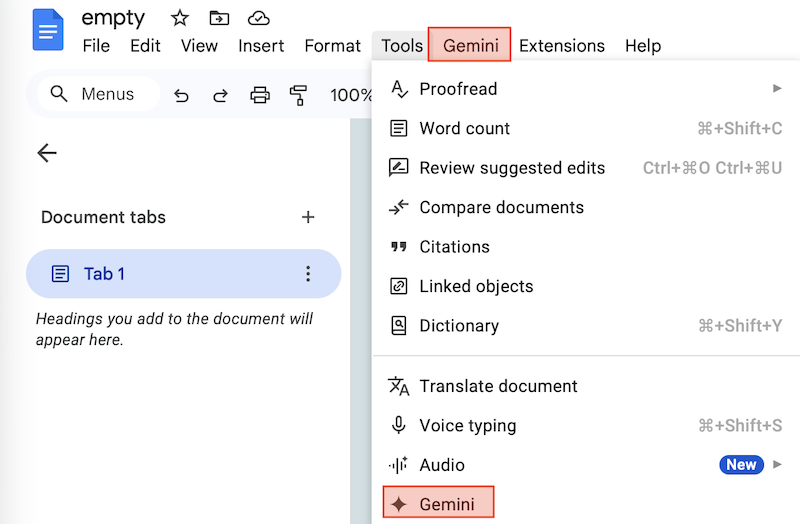
- 4 ways to get to the same “Gemini” sidebar, not clear what’s the difference between entry points.
- Task it failed miserably at:
- “Reverse the order of entries in the document, make it from newest to oldest and grouping by month and collapse those”
- The reply was a half-truncated document with semi-randomly shuffled text.
- I think at some point the context window got truncated / compacted?
Google Sheets
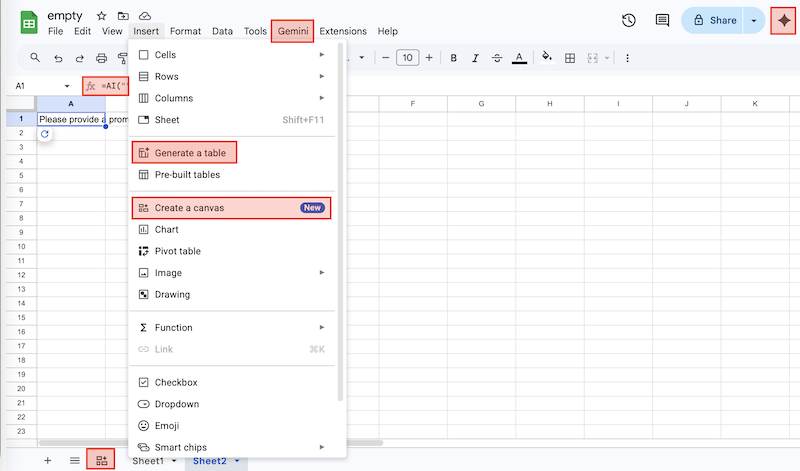
- At least 4 different ways(!) to get to the Gemini sidebar, and different from Google Docs, to get to the Gemini sidebar.
- My favorite one is the
AI()formula, which never worked for me. But it’s amusing as a source of nonsense generation. - Task it failed miserably at:
- Take all sheets in directory A and merge them into a single sheet, then generate a pivot table.
- The result was either that it can’t create a spreadsheet/can’t read a spreadsheet or it generated a sheet with 10 records and some garbage data at the end.
In conclusion, this is not surprising – as there are multiple groups of people working on a competing set of AI-related projects. The current approach is to “throw some AI on the wall and see what sticks”… My next plan is to switch to plain-text Markdown/CSV/Git repo and work with Gemini CLI to implement those simple tasks.